1869 Black Rock Turnpike, Fairfield, CT 203-332-3300
Traditional Values. Modern Excellence.
Student Hub

Everything You Need for Your Tae Kwon Do Journey.

Schedules, school announcements, training resources and helpful information — all in one place for Song Tae Kwon Do students and families.

Stay Informed

Announcements

Check here for school notices, upcoming events, reminders and important updates.

School Notices
All Clear

No Current Notices

There are no schedule changes or school closures to report at this time.

You're all caught up.

Upcoming Events

Song TKD Academy Black Belt Promotion

October 11, 2026 · 11:00 AM
Easton Community Center
364 Sport Hill Rd, Easton, CT 06612

Begins promptly at 11:00 AM. Please arrive early to allow time for parking.

Reminders
All Clear

No Current Reminders

There are no deadlines or action items to remember right now.

You're up to date.

! Important Updates
All Clear

No Important Updates

There are no special updates requiring your attention at this time.

Everything is running as usual.

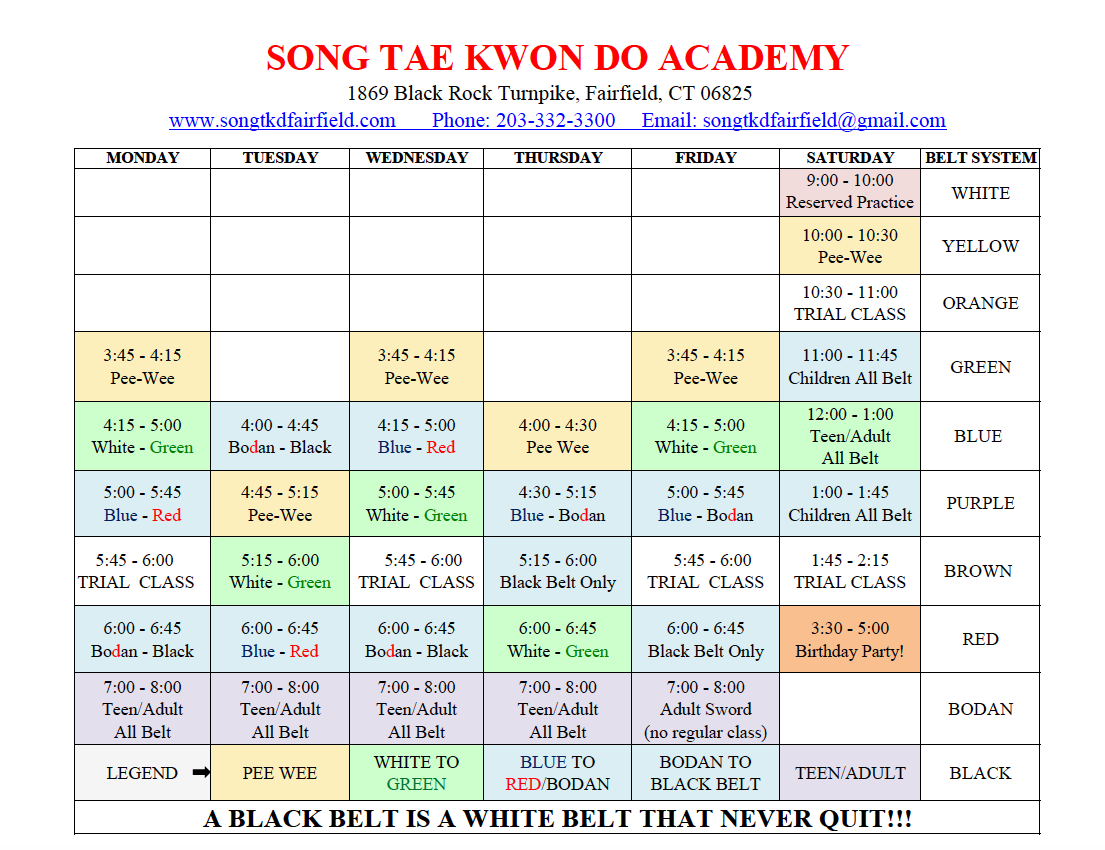
Daily Class Schedule

Song Tae Kwon Do Academy daily class schedule

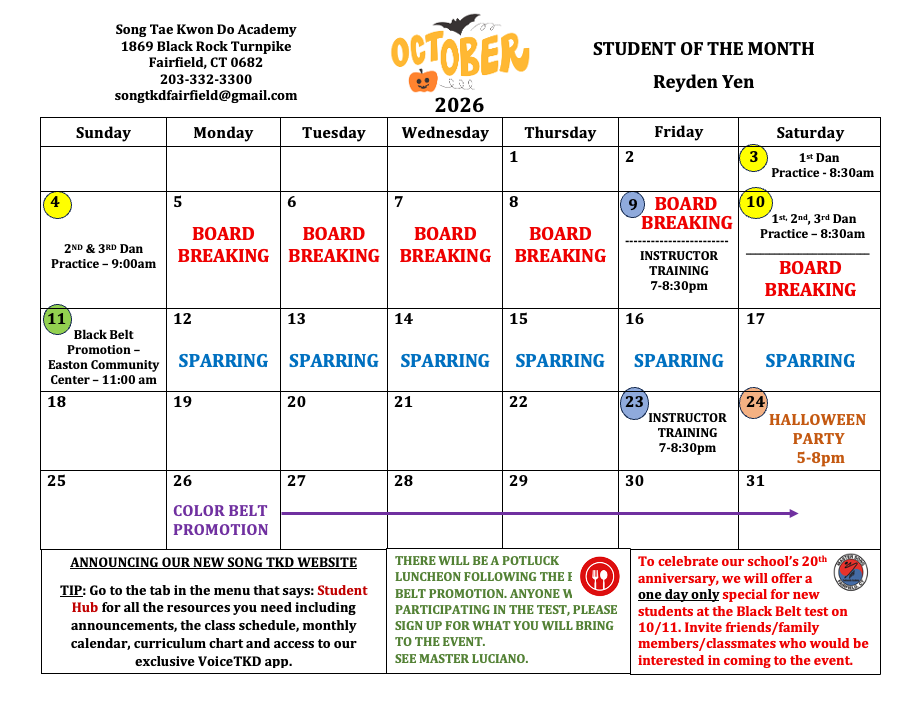
WHAT'S HAPPENING IN THE DOJANG THIS MONTH!

Song Tae Kwon Do Academy monthly events calendar

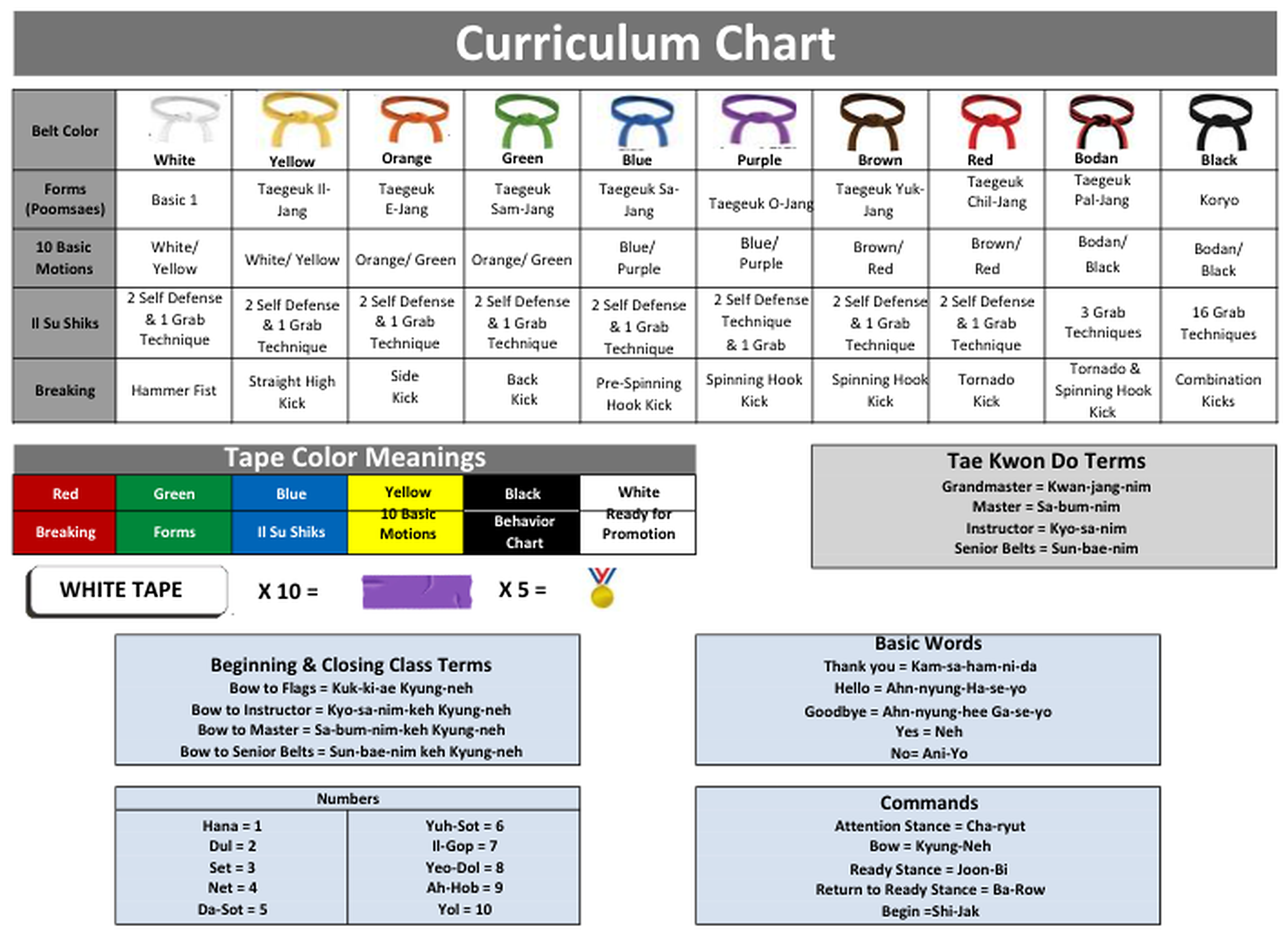
The Journey From White Belt To Black Belt

Song Tae Kwon Do Academy belt ranking curriculum chart

Master Your Curriculum with Voice TKD

We are thrilled to give our students exclusive access to Voice TKD, a one-of-a-kind training app co-created right here by our instructors! Unlike traditional video libraries that force you to stop moving and stare at a screen, Voice TKD uses 100% voice-guided instruction to walk you through your exact belt requirements.

You can keep your eyes locked on your target and your mind focused on your technique.

Eyes-Free Training

Perfect your stances, blocks, and kicks without looking down at a screen.

Custom Pace

Follow step-by-step audio cues that match your specific belt rank curriculum.

How to Get Started

1

Click the Portal Link Below to log into the Voice TKD student dashboard using your academy credentials.

2

Select Your Current Belt Rank to view your active audio curriculum modules.

3

Press Play and Train!

Voice TKD Frequently Asked Questions

How do I get my login credentials?

Your account is automatically created when you enroll at the dojang. Check your welcome email for your temporary password, or use the "Forgot Password" link on the portal using the email address you registered with us.

Can multiple family members share one account?

Yes! If you have multiple children training, you can use a single family login. The dashboard allows you to easily switch between profiles so each student can access their specific belt rank curriculum.

Do I need to look at the screen while training?

Not at all! Voice TKD is specifically designed for eyes-free training. Once you select your rank and press play, you can set your device down and follow the audio cues, keeping your eyes up and your focus on your technique.

Can I access Voice TKD on a computer, or just a phone?

You can use both! You can download the app on iOS and Android devices, or log in directly through our website student portal on a desktop, laptop, or tablet. Many parents prefer casting the audio to a Bluetooth speaker in the living room.

What should I do if the audio commands are moving too fast or too slow?

Inside the playback settings of the app, you can adjust the narration speed. We recommend slowing it down when first learning a new poomsae (form), and speeding it up to real-time match tempo as you get closer to belt testing.

How to Tie a Tae Kwon Do Belt

Follow along with this step-by-step video whenever you need a quick refresher.